Great teaching and meaningful human connections are at the heart of learning. Educational technology is a tool that should support, not replace, teachers and classroom learning.
The Los Angeles Unified Guidelines for Student Screen Time Policy helps schools use educational technology in ways that strengthen teaching, support student learning and well-being, and encourage a healthy balance between digital and non-digital learning. These guidelines were developed using research and input from thousands of students, families, educators, school leaders, and community members, and will continue to be reviewed and updated as new research, technology, and feedback become available.
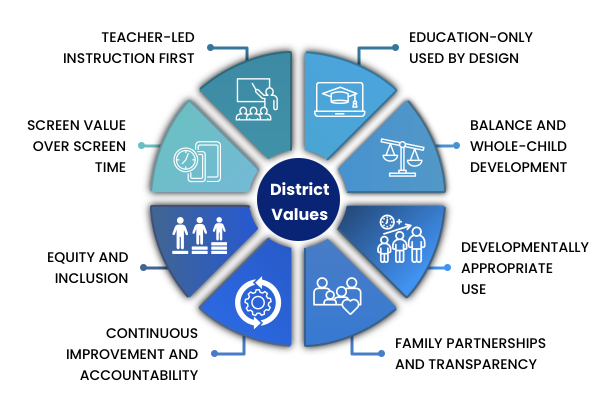

LAUSD Guidelines for Student Screen Time Policy
 News and Announcement
 View the updated Responsible Use Policy (RUP) with Attachment D for Parents to Opt-In to Take-Home Devices ; and the updated Google Consent Form that's available for parents and families via Parent Portal or printed at the school site ( English / Spanish ).
 Parents and families are invited to join this webinar and learn more about LAUSD’s new Guidelines for Student Screen Time Policy. Kindly note that our September webinars have been moved to October
Dates: August, September, October, and November
Time: 9:00 a.m. - 9:30 a.m. and 5:00 p.m. - 5:30 p.m.
Flyers:
 Parents and Families
Discover guides and tips to help support healthy digital habits, balance screen time, and stay engaged with your student’s learning at home.
 Principals and Administrators
Access administrative toolkits, policy guidelines, and leadership strategies to effectively implement and monitor screen time policies across your campus.
 Teachers and School Staff
Find classroom strategies, lesson plans, and professional learning modules to blend purposeful tech integration with active, hands-on instruction.






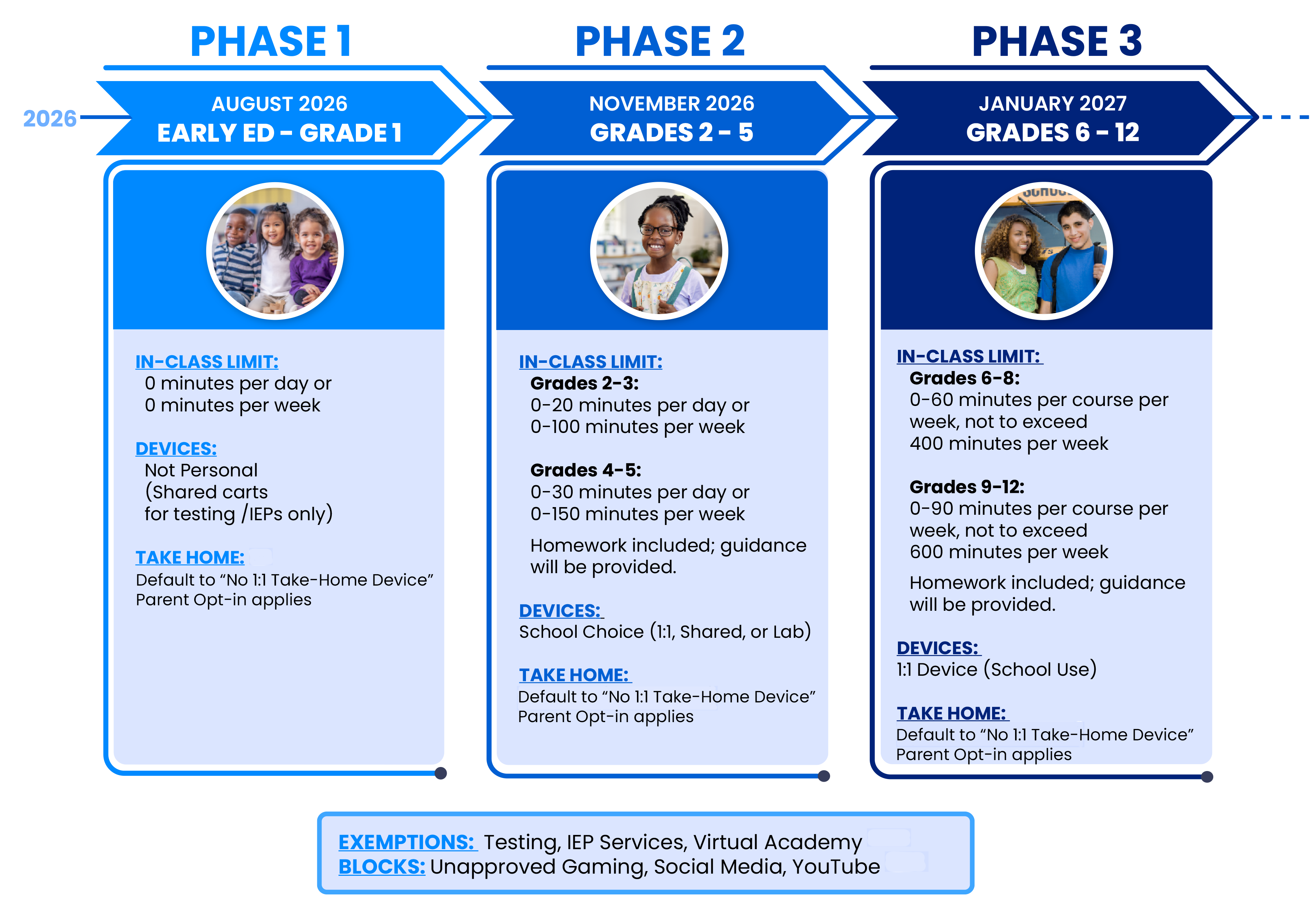
 Some courses and learning experiences may require greater use of technology to achieve their instructional objectives. Screen time guidance should be applied with consideration for the unique requirements of courses such as:
- Computer science
- Graphic design
- Digital media arts
- Yearbook
- Engineering
- Career technical education pathways
- Other technology-intensive programs


- Use of devices for students with diverse needs, including, but not limited to, students with disabilities and English Learners
- Access to digital tools when necessary to implement an IEP or Section 504 Plan, provide assistive technology (AT), or meet accessibility needs
- Parents and Guardians have the right to:
- Receive information regarding their child’s use of digital tools, including time spent on devices
- Opt-in their children to using a district device at home, based on availability and school discretion
- Consent to use Google Additional or Non-Core Services
- Prioritize non-device homework like reading, writing, and hands-on activities
- Device-required homework must be purposeful, educational, and balanced with non-screen tasks
- Consider student technology access, family circumstances, and cumulative screen exposure when assigning homework